
In Empath, 1 seat = 1 employee.
So if your organization has 12 employees using Empath, you would typically need a quantity of 12 seats on your subscription.
Our subscription and payment management is powered by Chargebee, where approved billing users can review and update subscription details.
Before you begin
To make subscription changes, you’ll need to sign in with the email address of an approved Empath billing user.
If you’re unable to access the billing portal or need help making changes, contact support@empathmsp.com.
How to change your seat quantity
- Go to the Empath billing portal:
https://empathmsp.chargebeeportal.com - Log in using the email address of an approved billing user.
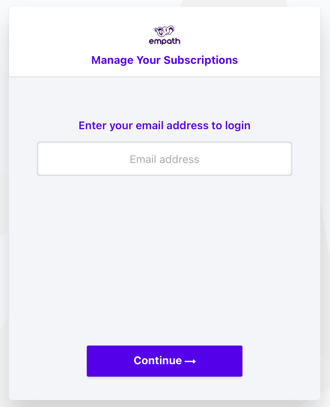
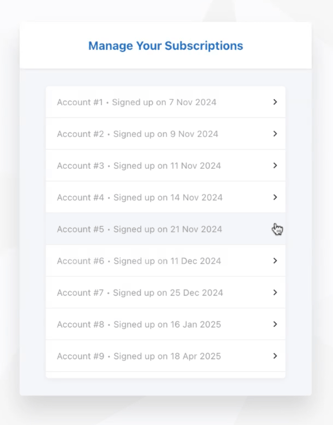
- Select the subscription you’d like to update.
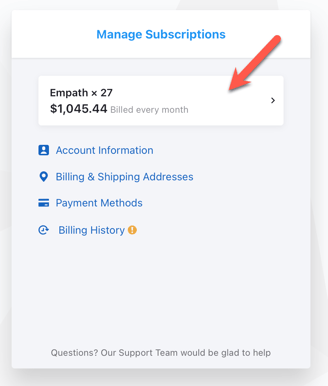
- In the Manage Subscription window, click on the subscription line item. This is usually shown with the term and current quantity.
- Select Edit Subscription.
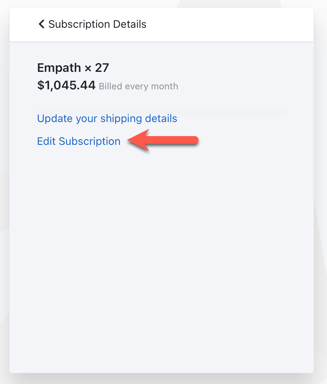
- Update the quantity to the number of seats you need.
Remember: the quantity should match the number of employees you want covered in Empath.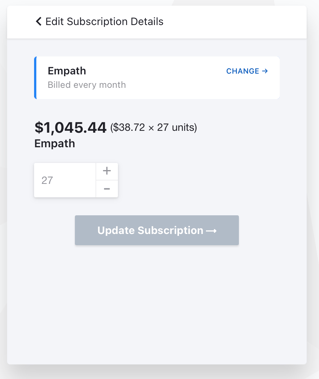
- Review your changes and save or confirm the update.
Important things to keep in mind
In many cases, you can adjust your seat count directly in the billing portal. However, there are a few situations where you’ll need to contact support@empathmsp.com for help.
Contract minimums
If your subscription is under a 1-year, 2-year, 3-year, or other term agreement, you may not be able to reduce your seat count below your contracted minimum until your renewal date.
For example, if you’re contracted for 15 seats:
- You can increase to 16 seats
- You can later decrease back to 15 seats
- You cannot reduce to 14 seats until the contract renews
If you need help understanding your current minimum seat commitment, contact support@empathmsp.com.
Pricing does not look right
If you increase your seat count and the per-seat price is not what you expected, please reach out to support@empathmsp.com.
Our team can review your subscription and, if needed, manually adjust pricing.
Looking to lower your price?
If you’d like to reduce your overall Empath cost, we may be able to help.
We offer discounted pricing for customers who move to a 1-year, 2-year, or 3-year agreement. If you’d like to explore contract pricing options, contact support@empathmsp.com and our team will walk you through what’s available.
Need help?
If you run into issues updating your subscription, have questions about seat minimums, or want help reviewing pricing options, contact support@empathmsp.com and we’ll be happy to assist.