
Empath records progress only for content that has been assigned to the member. Anything a member views without an assignment is not recorded or reported.
What members see in What's Next
The What's Next area on a member's home screen shows only items assigned to them, in this order:
- Assignments with due dates, soonest first.
- In-progress items, ahead of anything not yet started.
Pathways, courses, lessons, and assigned live stream recordings appear here. Upcoming live streams do not.
What happens when a member opens unassigned content
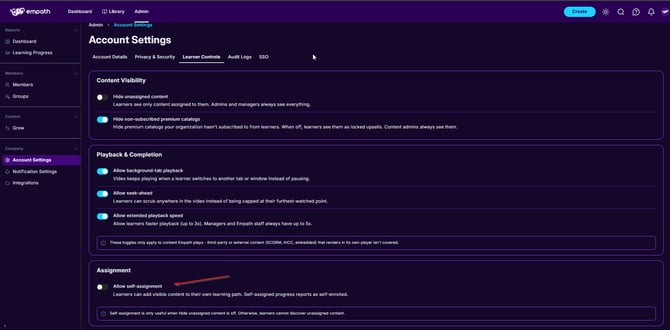
Two settings control this. An account admin manages both under Admin > Account Settings > Learner Controls.
- Hide unassigned content: When on, members see only content assigned to them. Admins and managers always see everything.
- Allow self-assignment: Off by default.
Either way, content that is not assigned is not tracked, and its knowledge checks are not scored.
Self-assignment off
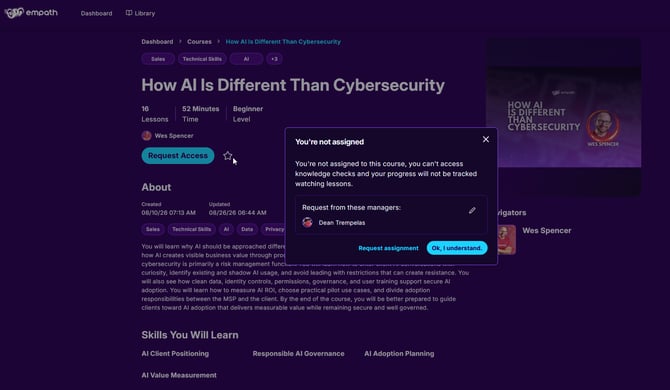
The member sees a “You’re not assigned” message. It tells them they cannot access knowledge checks and their progress will not be tracked while watching lessons.
If the member selects Ok, I understand, some content still opens. Knowledge checks are blocked with “You’re not assigned. Only users assigned to this course can take the quiz.” Nothing the member watches is saved, and it does not appear on their report card or dashboard.
To get the content assigned, the member selects Request assignment, searches for one or more managers, and selects Send Request. Only the managers they select are notified. Progress and knowledge checks start tracking once a manager assigns the content.
Any manager can assign content to a member at any time, whether or not the member sent a request. For the member’s steps, see How Do I Request Access to a Course in Empath? For where managers see requests, see Where Do I See Course or Pathway Assignment Requests from Employees?
Self-assignment on
The member sees a button that reads Get Started, Start Learning, or Assign Course, and can assign the content to themselves without approval. Self-assigned progress reports as self-enrolled.
Some content opens right away. Empath still shows a message warning that unassigned content will not track, and the member can assign it from there. If they skip it, nothing is tracked or scored.
Self-assignment only helps when Hide unassigned content is off. If it is on, members cannot see unassigned content to add it.
Content that must be assigned
Some SCORM packages have their own rules built in and must be assigned before a member can use them. A manager assigns them under the default settings. If self-assignment is allowed, the member can assign them to themselves. Empath cannot change how that content works. It is most often HR-style mandated training.
How assignment cascades
When you assign a pathway, Empath also assigns the courses in it. For each course, Empath assigns the lessons, knowledge checks, and any associated live streams.
Because this is layered, the chain can occasionally miss an item. To re-check an assignment:
- Go to Admin > Members and open the member.
- Open the Learning Progress tab.
- Find the item and open its three-dot menu.
- Select Update Assignment.
Update Assignment re-checks the item and assigns any lesson or quiz that is missing. It fixes most gaps caused by earlier assignment changes or content updates.
Update Assignment is available for some content types only. The same menu includes Unassign, so check which option you are selecting. If Update Assignment is not in the menu for the item you need, use the support steps below.
How progress is calculated
Empath records the member's position or time in a lesson about every few seconds. Lesson progress feeds course progress, and course progress rolls up into pathway progress.
Videos
Lesson time is the length of the video. As the member watches, their position is converted into a percentage.
Text and iframe lessons
Empath cannot see where a member is inside external content such as an embedded guide or outside page. It estimates progress from word or character count, estimated reading time, time on the page, and scrolling. It counts time on the page up to a reasonable limit, and longer lessons require scrolling so that a page left idle at the top does not count as complete.
Lessons with both video and text
Empath does not add video time and reading time together. The video length is the lesson's time value.
Knowledge checks and quizzes
Knowledge checks follow the same rule: the member must be assigned. A member who is not assigned cannot access the knowledge check.
When an assigned member completes a knowledge check, Empath records their score percentage. Retakes and multiple attempts are recorded at the course level for that member.
To review a member's knowledge check results:
- Go to Admin > Members and open the member.
- Open the Learning Progress tab and select the content that has knowledge checks.
- Select the Knowledge Checks tab.
Managers can see how many times the member has taken a knowledge check, whether an admin marked it complete, and which questions were answered right or wrong. Managers cannot download, view, or print a report that shows question-by-question answers in one view.
To see completion across everyone assigned a course or pathway, use Learning Progress under Reports in the Admin area. See How to Use the Learning Progress Dashboard in Empath.
Troubleshooting
A member says they finished, but it shows not started or incomplete
Check the assignment first. Only assigned content is tracked, and anything viewed before it was assigned was not recorded.
- Open the member's Learning Progress tab and confirm the content is assigned at each level that applies: the pathway (if you use one), the course, and the specific lesson or quiz.
- Run Update Assignment as described above.
A pathway does not reflect completed courses
Run Update Assignment on the pathway. Progress can look inconsistent when the assignment chain was incomplete before an update. If the pathway still does not reflect the completed courses, use the support steps below.
A quiz will not submit, or a lesson does not show as assigned
Run Update Assignment on the course or pathway that contains it.
Progress or video playback behaves unexpectedly
Check for browser extensions, ad blockers, or security tools that block cookies or scripts. These can interfere with video playback, reporting, and progress tracking.
Support
If someone in your organization can access Empath, use the in-app chat bubble. If you cannot access Empath at all, email support@empathmsp.com.
Include the affected member's email, the course name, the specific lesson or quiz, what you expected, what you saw, and a screenshot or recording.